RL Presets¶
RaceLink presets ("RL presets") are host-stored, named snapshots of effect parameters. A scene action can apply one by name instead of inlining a dozen parameters into every action, and RotorHazard can apply one by id. This page covers the RL Presets library; for using a preset inside a scene see Scene authoring.
Audience. Operators building the reusable effect library their scenes draw on.
RL Presets vs WLED Presets. RL presets are RaceLink-native and referenced by name; WLED presets are WLED's own per-device slots, addressed by index, and managed in the WLED Presets dialog. Both terms are defined in the Glossary §"Preset".
The RL Presets dialog¶
Open it from the RL Presets button on the Devices-page menu band, or Manage RL Presets on the Scenes page.
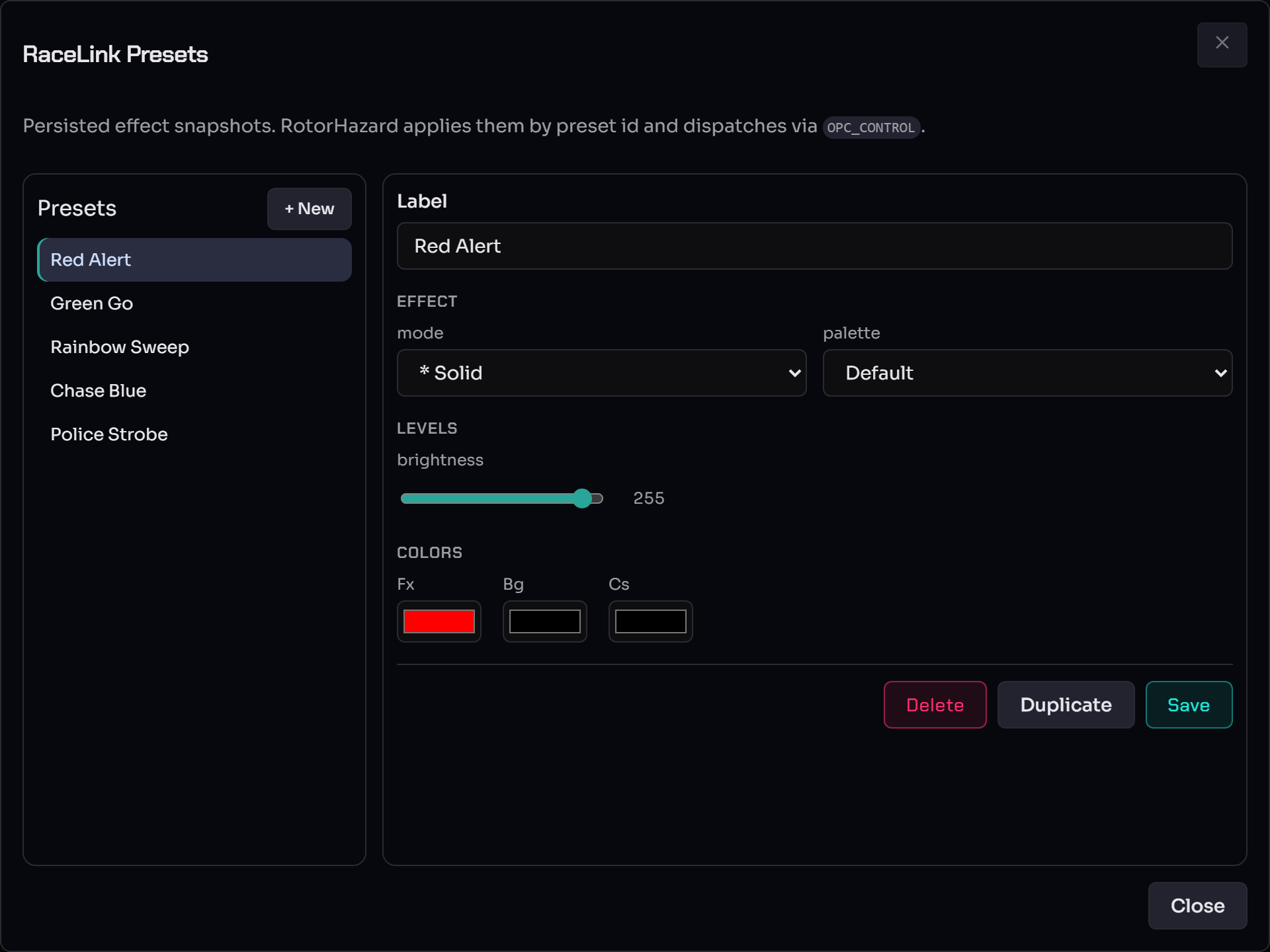
The dialog is split into two panes:
- Left — the library. Every saved RL preset, plus + New. Each row is a named snapshot (e.g. Red Alert, Green Go, Rainbow Sweep).
- Right — the editor for the selected preset:
- Label — the preset name (referenced from scene actions).
- Effect — mode (the effect kind, e.g.
* Solid) and palette. - Levels — brightness (0–255).
- Colors — Fx (foreground/effect), Bg (background), and Cs (custom/secondary) colour pickers.
- Delete, Duplicate, Save.
The fields adapt to the effect mode — solid colours expose colour pickers; palette effects expose a palette and speed; pattern effects expose per-segment parameters.
Create and edit a preset¶
- Click + New, give it a Label.
- Pick the mode and palette, set brightness, and choose the Fx / Bg / Cs colours.
- Click Save.
Duplicate clones the selected preset as a starting point; Delete removes it (confirm-gated). The editor warns on unsaved changes via the same byte-exact dirty check the scene editor uses — if the prompt fires after a save, you've changed something since.
How presets are referenced¶
RL presets are referenced by name from scene actions
(apply_rl_preset:<name>). Renaming a preset re-points every scene
action that uses it automatically — the host re-writes scene records
when the preset record changes, so you never chase stale references.
RotorHazard applies presets by id and dispatches them via
OPC_CONTROL (as the dialog's subtitle notes). For the wire-level
mapping of an RL preset to OPC_CONTROL see
opcodes.md.
The cost-estimator badge in the scene editor shows roughly how many bytes each application costs — your guide if you need to fit a multi-action scene under tight LoRa airtime.
See also¶
- Scene authoring — composing scenes that apply these presets, the target picker, offset mode, and the run flow.
- Discover & configure devices — apply a preset to a single device directly from its Device Options dialog.
- Opcodes —
OPC_CONTROLand how a preset maps to the wire. - Glossary §"Preset".