Multi-Network operator guide¶
Connect more than one RaceLink gateway to the same host, drive each on its own LoRa channel, and keep their device sets cleanly separated. This guide walks the flows an operator interacts with: creating a network, the bind wizard, RF migration after a channel change, the per-network reconnect banner, and Channel Scan to recover stranded devices.
For the underlying wire formats, see
reference/wire-protocol.md §
P_RfConfig and §OPC_RF_CONFIG. For the channel table itself,
see reference/channels.md.
Networks also come in an Ethernet kind (draft)
This guide covers RF networks (a LoRa channel bound to a gateway). A network can instead be of kind Ethernet — an IP/LAN network where the host interface is the transport, reaching devices over UDP. See Ethernet networks (draft proof-of-concept).
When you'd reach for this¶
A second gateway buys you two things, both of them direct consequences of running a second LoRa radio in parallel:
- More bandwidth. Each gateway transmits independently on its own channel, so two gateways roughly double the airtime budget for fleet-wide operations. A scene that broadcasts to both halves of the deployment runs in the airtime of one radio, not the sum.
- Parallel communication with different parts of the setup. The host can drive one part of the deployment at the same time as another, rather than serialising every packet through a single channel.
The rest of this guide walks the operational flows that come with running more than one gateway: creating networks, the bind wizard, RF migration after a channel change, hardware-swap recovery, the per-network reconnect banner, and Channel Scan for stranded devices.
Concept refresher¶
- A Network (
RL_Network) is the operator-visible bundle of a name, agateway_macbinding, and anrf_config. Devices belong to exactly one network at a time. The host's v1→v2 migration creates a default network on first boot so single-gateway deployments inherit the multi-network data model transparently. - A Group's network is decided by its members, not set up
front. A group holds devices from exactly one network (the
boundary validator refuses to mix networks in a group). A new or
emptied group is network-agnostic — it has no network and shows
no network badge; the first device that joins
stamps the group's network, and therefore whether it is an RF or
an Ethernet group. Remove the last device and the group reverts to
unassigned, free to be re-purposed for either kind. (
Unconfiguredand the staticAll WLED Nodesgroup are permanently agnostic.) - A Channel is a named slot in the host's region table
(max five per region — see
reference/channels.md). Picking a channel for a network resolves to the seven wire-formatP_RfConfigfields. - Bind state per attached gateway:
pending,bound,conflict, orunbound. The bind state machine inspects every gateway as it attaches. The bind wizard auto-opens forconflictonly; anunbound(unexpected) gateway is surfaced non-blockingly by the amber unexpected-gateway bar and assigned through the Gateway Assign dialog. The broader SetupChangeAssistant is operator-triggered (see Reconnect banner below). - RF state per attached gateway:
IDLE,TX,RX_WINDOW,RX,ERROR, orUNKNOWN. Mirrored from the gateway's spontaneousEV_STATE_CHANGEDevents. The per-gateway pill in the header colour-codes Bind + RF state together (see Per-gateway pills below).
Day-to-day: the Devices page with two gateways¶
After a successful boot with two gateways attached:
- The Network filter dropdown appears above the Groups sidebar — only visible at N>1, so single-gateway deployments see no UX change. "All Networks" is the default.
- The Device Table gains a "Network" column with a coloured badge per row (deterministic palette by network id; a given network keeps the same colour across reloads).
- Hover the badge for the device's last-known
freq_hz/ SF / BW / SyncWord — a quick read of "is this node where the network expects it to be". - Group filter still works the same; combined with the network filter, the table shows the intersection.
Network badges¶
A network badge is a small coloured chip naming a network, with a kind icon — a radio glyph for RF, a network glyph for Ethernet — so the two network kinds are distinguishable at a glance. The colour is a deterministic palette pick by network id, so a given network keeps the same colour across reloads.
The badge appears wherever a device or group's network is shown:
- the Device Table "Network" column (hover for the device's
last-known
freq_hz/ SF / BW / SyncWord on RF rows); - the Groups sidebar rows;
- the Manage groups dialog;
- the scene editor's Select target groups picker.
Static groups (Unconfigured, All WLED Nodes) and empty / unassigned
groups carry no badge — they belong to no single network (see the
group-network rule in the concept refresher).
The Network Manager dialog¶
The Network Manager covers CRUD on existing networks — rename, switch channels, and remove. It is opened from the master bar.
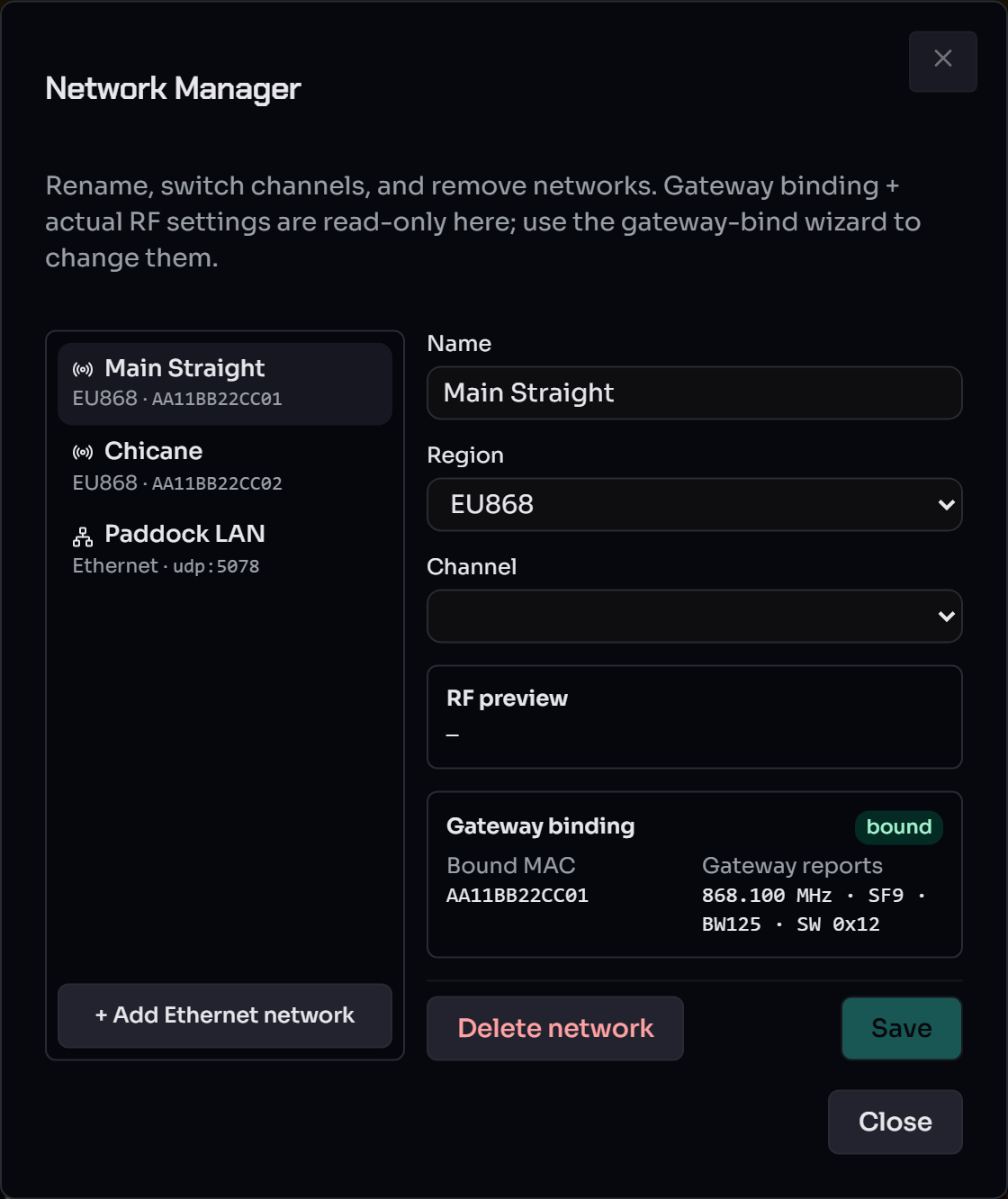
The left pane lists every network with its kind and binding (RF
networks show <region> · <gateway MAC>; Ethernet networks show
Ethernet · udp:<port>), plus an + Add Ethernet network button.
The right pane edits the selected network's Name, Region and
Channel, with a live RF preview. The Gateway binding panel
(bound MAC + the settings the gateway actually reports) is read-only
here — change the binding or actual RF settings via the gateway-bind
wizard, not this dialog. Save persists name/channel edits (a
channel change that diverges from what the gateway is broadcasting
prompts an RF migration); Delete network removes
the selected one.
Detecting and assigning gateways¶
A gateway that attaches but matches no configured network
lands in state unbound. Instead of stealing the screen with
a modal, the host surfaces it for an explicit operator
decision.
Restart-free detection. Plugging in a new (or swapped) gateway no longer needs a host restart. The header's Scan Gateways button re-enumerates the USB ports and attaches any gateway it finds on a free port — including ones bound to no network. (Gateways the host already expects but lost are also picked up automatically by the 5 s reconnect tracker; see the reconnect banner.)
Unexpected-gateway bar. Any unbound gateway raises a
non-blocking amber bar below the header listing each
gateway's ident_mac and the RF settings it is broadcasting
on. Click Assign… to open the Gateway Assign dialog.
Gateway Assign dialog. One editable row per unexpected gateway — so a single-gateway swap and a whole multi-gateway setup change share the same flow. Per row pick one of:
- Create a new network — name + region;
rf_configis seeded server-side from what the gateway is broadcasting. - Replace the gateway of "<network>" — the guided hardware-swap. Networks whose bound gateway is currently missing ("orphaned") are listed first and pre-selected 1:1, so re-mapping the same nodes onto new gateways is the default one-click path.
- Bind to "<network>" — take over any other RF network's binding.
Hit Assign to fan the choices out (one
create_network / rebind per row). If a chosen network's
persisted rf_config disagrees with the gateway's NVS, that
gateway flips to conflict and the bind wizard opens next
so you can resolve.
RF vs Ethernet compatibility. Only RF networks are
offered as rebind / replace targets — Ethernet networks run
over the host NIC and carry no gateway_mac, so a LoRa gateway
can never drive one. The server enforces this too (a rebind
onto an Ethernet network is rejected), and the host has no
finer per-band capability data: any RF gateway is treated as
eligible for any RF network.
Conflict resolution¶
State conflict means: the gateway is bound to a known
network, but its NVS RF settings disagree with what the
network expects. The wizard renders a per-field diff
("Host expects" vs "Gateway reports") and asks for one of:
- Accept the gateway's settings. Updates the network record to match the gateway. No migration, no device reboots. Use this when you flashed or re-tuned the gateway intentionally.
- Push the host's settings (migrate). Runs the four-phase
RF migration: push
OPC_RF_CONFIGto every device, then persist-switch the gateway, then verify via discovery. See Migration below.
The wizard stays open while a migration is in flight (the
state stays at conflict with migration_pending=true until
the engine flips it back to bound).
RF migration¶
Three operator paths trigger an RF migration; they all run the same four-phase TaskManager job:
- Bind wizard → "Push the host's settings" when the gateway
comes back in a
conflictstate. The wizard stays open and switches to amigratingstep that subscribes to the task's live phase / index / total / current MAC and shows a progress bar. When the task completes, the wizard flips todone(orerror) with a Close button. - NetworkManagerDialog → edit channel → Save. If the new RF
config differs from what the gateway is actually broadcasting
(
gateways.get(mac).rf_config_actual), a confirmation prompt asks whether to push to the gateway. Choosing Migrate kicks the same TaskManager job; progress shows in the master bar's task line. - NetworkManagerDialog → "Custom RF" → Save. Same flow as the channel edit, just with raw P_RfConfig values from the channel-table's "unchanged" option.
A single migration job at a time — the host returns 409 busy
if another long-running task (firmware update, channel scan)
is already in flight.
The four phases:
- Pre-check — list every device on the network. Skip
those already on the target config (their
last_known_rf_configmatches). Optionally skip offline devices; the operator can override that from the wizard. - Phase 1 — Device push. For each remaining device the
host sends
OPC_RF_CONFIG(target)via the current (old-config) gateway. Each device validates, persists to NVS, ACKs, then reboots ~50 ms later onto the new settings. They become invisible to the current gateway — expected. - Phase 2 — Gateway switch. After every device push
completes (or the operator overrides on a partial), the
host sends
GW_CMD_SET_RF_CONFIG(target, persist=true). The gateway writes NVS + reboots onto the new settings. The host's reconnect machinery re-opens the USB device automatically. - Phase 3 — Verification. Post-reboot discovery on the
new channel. Devices that respond have their
last_known_rf_configupdated. Devices that don't are marked stranded — see Channel Scan below.
A successful migration flips the bind state back to bound
on the SSE channel; the wizard closes itself.
Channel Scan (stranded-device recovery)¶
Open with the 🔎 magnifier button in the header (or via the SetupChangeAssistant's per-row "Run channel scan" action).
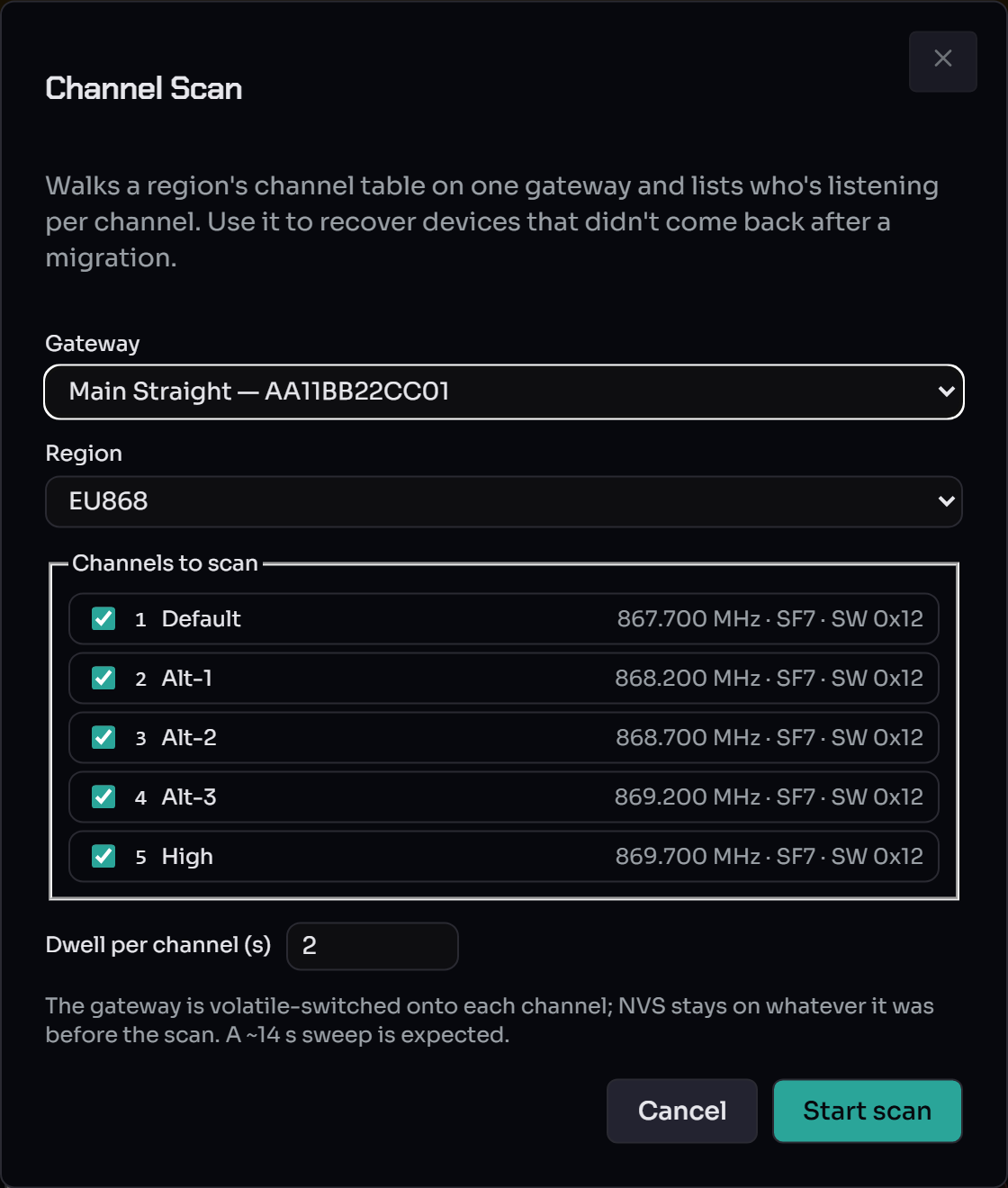
- Pick the gateway to scan from (single-gateway deployments default to the only one).
- Pick the region. Defaults from the chosen gateway's network.
- Tick the channels to walk; defaults to every channel in the region.
- Set the per-channel dwell. The default 2 s catches the discovery-default reply window with margin.
- Hit Start scan. The gateway volatile-switches onto each
channel (no NVS write), broadcasts
OPC_DEVICES, dwells, then moves on. After every channel the gateway is restored to its pre-scan settings via another volatile switch.
The result panel shows a per-channel table:
- Known devices: name + MAC + which network they
currently belong to. Their
last_known_rf_configis updated in-place so a follow-up migration can skip them. - Unknown devices: MAC only, tagged amber. These are nodes the host's repo doesn't know about; you'd typically run the discovery dialog with the scanned channel as the active one, or migrate them in via a temporary network.
The scan is read-only at the device level — it doesn't push any settings, only observes. Stranded devices stay on their own NVS-persisted channels until you explicitly migrate them.
Per-gateway pills¶
The header's master bar carries one pill per attached gateway instead of the pre-multi-network single master pill. Each pill combines the two state machines via colour:
| Bind state | RF state (when bound) |
Colour | Meaning |
|---|---|---|---|
bound |
IDLE |
green | Ready for next send. |
bound |
TX |
blue | Transmitting on the LoRa wire. |
bound |
RX / RX_WINDOW |
warm yellow | RX window open waiting for a node reply. |
bound |
ERROR |
red | Gateway reported a fault. |
bound |
UNKNOWN |
grey | No spontaneous state event yet — click ↻ to query. |
conflict |
— | amber border | Bind wizard wanted: RF config disagrees with the network. |
unbound |
— | red border | No matching network — assign it from the unexpected-gateway bar. |
pending |
— | grey | Mid-handshake, or last GET_RF_CONFIG didn't reply. |
The label inside each pill is the network name (Pit-Lane,
Default, …) plus the last 4 hex of the gateway's ident_mac
to disambiguate two gateways on the same network. Hover reveals
the full ident_mac, bind state, RF state and any conflict
fields.
The ↻ button next to the pills fans a GW_CMD_STATE_REQUEST
out to every attached gateway in parallel and refreshes every
pill in one round-trip. Used right after a reconnect when a
pill is still grey but you want confirmation it's actually
back on the wire.
A ⚠ Pair… button appears in the header whenever any
gateway is in conflict — clicking it re-opens the bind
wizard for the affected gateway without needing a USB
reconnect. (unbound gateways are handled by the
unexpected-gateway bar, not
this button.)
Per-network reconnect banner¶
When a gateway disappears mid-session (USB cable yanked, adapter glitch, intentional unplug), only that one transport drops out — sibling gateways stay fully online and keep their device traffic flowing.
What the operator sees:
- The disappearing gateway's per-gateway pill vanishes from the master bar.
-
A red reconnect banner appears below the header listing every persisted network whose
gateway_macis not currently attached, with a per-row live countdown:⚠ Pit-Lane (9C:13:9E:9E:1C:10) — retry in 4s [Cancel] ⚠ Default (48:CA:43:3C:D4:E0) — retry in 2s [Cancel]
[Open Pair Assistant] [Cancel all]
-
The host's background reconnect tracker polls every 5s for the missing MACs. The probe enumerates only ports that are NOT currently in use, so no healthy transport is ever disturbed.
- As soon as the operator plugs the gateway back in, the next poll tick discovers it, attaches it, sends a state-request to seed the pill colour, and removes the row from the banner.
Cancel drops a single MAC out of the tracker until the
operator opts back in. Useful for an intentionally-retired
gateway you don't want to keep seeing in the banner — the
network row stays in the database, just isn't being polled
for. The Open Pair Assistant button reaches the broader
diff view (see below).
Reconnect on host restart. When the host process itself
restarts, both gateways attach during the normal discoverPort
boot path; the tracker only fires if a persisted network has
no matching transport after that boot.
Setup-Change Assistant¶
The assistant catalogues every operator-actionable diff across the networks + gateways + devices repos. It used to auto-open once per session — that was disabled to stop dialog-spam during USB flicker. The assistant is now reached via:
- The reconnect-banner's Open Pair Assistant button (covers the missing-transport case),
- The header's
⚠ Pair…button (coversconflict;unboundgateways route to the Gateway Assign dialog), - The host-settings menu (operator-driven inspection at any time).
The Pair Assistant front-end of the assistant walks the four device-recovery cases when pre-existing devices don't auto-pair after a gateway change — pick the situation that matches your setup:
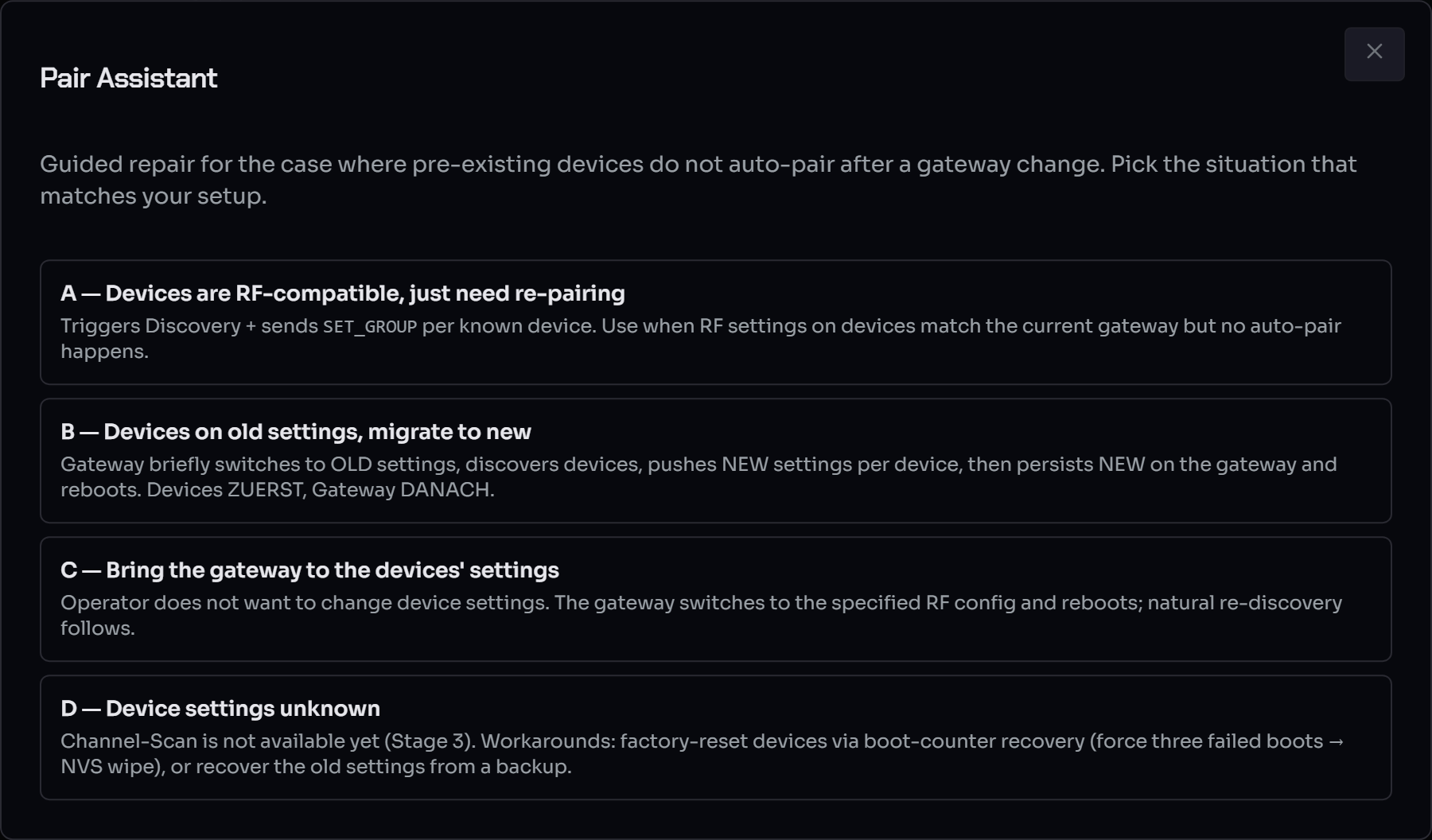
- A — Devices are RF-compatible, just need re-pairing. The devices already share the gateway's radio settings; runs a discovery + group-assignment sweep that re-binds every known device. No radio settings entered.
- B — Devices on old settings, migrate to new. The gateway briefly switches to the old settings, discovers the devices, pushes the new settings per device, then persists the new settings on the gateway. You pick both as a Region + Channel from the channel table (see Region & Channels).
- C — Bring the gateway to the devices' settings. The gateway adopts the devices' radio settings and reboots; natural re-discovery follows. Pick the device-side Region + Channel.
- D — Device settings unknown. Recovery hints only — recover the old settings from a backup and use case B, or factory-reset the affected devices via the boot-counter recovery path.
For B and C the dialog pre-selects the channel matching the gateway's current settings, so the common "align to what the gateway already has" case is one click.
Surfaced diff categories:
- Gateway not attached — a configured network's
gateway_macisn't currently visible on USB. The reconnect tracker is already polling for it; the assistant offers per-MAC cancel + a global "Re-discover now" trigger that forces an immediate enumeration (useful when you've just plugged the cable in and don't want to wait for the next 5s tick). - Unknown gateway — an attached gateway whose ident_mac doesn't match any network. Opens the Gateway Assign dialog.
- RF mismatch — bind state is
conflict. Open the bind wizard. - Devices on stale RF — at least one device's
last_known_rf_configdisagrees with the bound network's. Run a Channel Scan or trigger a migration to bring them in line.
Each row has a one-click follow-up button that hands off to the right wizard.
Boundary enforcement¶
A scene action or bulk regroup that would mix devices from different networks is rejected by the host with HTTP 400:
- The MultiGroupPickerDialog in the scene editor anchors on the first selected group's network; groups on other networks get a disabled checkbox + an "other net" pill.
- The bulk regroup endpoint
(
POST /api/devices/update-metawith agroupId) runs the same validator server-side before the TaskManager job kicks off — the WebUI shows the structured error in a toast. - Moving devices into the Unconfigured group (id 0) is always allowed; it's the cross-network sink.
- Moving a device into an empty (network-agnostic) group is also always allowed — there is no network to conflict with yet; the move stamps the group's network (and kind) from that first device. This is how an Ethernet device reaches a group: create a fresh group and drop it in.
The validator lives in
RaceLink_Host/racelink/domain/network_boundary.py. Two
boundary violations it detects:
devices_span_multiple_networks— the operator selected devices that don't share a network. Move them one network at a time.group_network_mismatch— the devices agree on a network, but the target group is somewhere else. Migrate the devices to the target network first, then re-run the regroup.
Scene broadcast scope¶
A scene's broadcast actions (sync, plus PRESET / CONTROL /
OFFSET with target.kind == "broadcast") need to know which
networks to reach. Each scene carries a network_scope field
with two modes:
Auto mode (default)¶
The host derives the scope from the scene's action targets at runtime. Every non-sync action contributes its target's resolved network(s) to a union:
| Action target | Contributes |
|---|---|
groups: [1, 2] (each group on net-A) |
net-A |
device: AABBCC112233 (on net-B) |
net-B |
broadcast (group 255) |
every persisted network |
sync / delay (no target) |
nothing |
The union becomes the scene-wide broadcast scope. Sub-actions
inside offset_group containers descend recursively.
Operator-visible consequence: a scene that only touches
net-A no longer sends sync ticks to net-B's gateway — uninvolved
networks can't accidentally fire pre-loaded arm_on_sync effects.
Explicit mode¶
The operator pins a specific set of network ids via the Scope chip in the scene editor header (a dialog with an Auto/Explicit radio + multi-select checkbox of networks). When explicit:
- The scene's runtime scope is the persisted list, soft-filtered against currently-attached networks (deleted networks drop out).
- The per-action target pickers in the editor restrict their group/device dropdowns to in-scope networks only. Out-of-scope choices are hidden.
- The
MultiGroupPickerDialogkeeps its single-network anchor rule per action but the visible groups are pre-filtered by the scene-wide scope first. - Save-time validation rejects an action that targets a network
outside the scope with
HTTP 400 {code: "scope_violation",
  offending_action_index: N}
— the editor highlights the offending row.
Persisted shape¶
"network_scope": {"mode": "auto"}
"network_scope": {"mode": "explicit", "network_ids": ["net-a", "net-b"]}
Scenes saved before this feature (no network_scope field) load
as {"mode": "auto"} — no migration required.
Degradation rules (operator-visible)¶
| Condition | Outcome |
|---|---|
| Auto-mode, sync-only scene (no resolvable scope) | Falls back to "every attached gateway" with a deprecation log |
| Explicit-mode, one of the listed networks is deleted | The id is silently dropped from the runtime scope; sidebar shows an amber dot until the operator reconciles |
| Explicit-mode, every listed network is deleted | Scope resolves empty; broadcasts are NOT fanned out (no silent widening back to "all attached"). Run records error="scope_resolved_empty" and marks the action degraded |
| Explicit-mode + action target outside scope at save | Rejected with HTTP 400 — operator must fix the action or widen the scope before saving |
Limits today¶
- No per-action override — a scene can't say "this particular sync fires only on network B even though the scene targets A+B". The scene-wide scope governs every broadcast in the scene.
- No manual SYNC button — broadcasts are scene-driven; the operator triggers them by running a scene.
- No cost estimator multiplier — the LoRa airtime estimate reflects single-network cost. A separate "Fan-out: N gateways" pill in the editor surfaces when a scene reaches 2+ networks (each gateway transmits in parallel, so wall-clock airtime is bounded by the slowest single-radio, not summed).
For deeper background see
architecture.md §"Cross-network fan-out".
Move groups between networks¶
A group ends up on the wrong network — either by an initial mis-bind or because the operator wants to reorganise which group belongs to which network. Since network membership lives at the group level (one network per group), the move is always group-granular: every member device follows its group. The WebUI exposes a single entry point — the sidebar's Manage groups dialog — which combines drag-reorder with multi-group network migration in one panel.
Where to start a move¶
Open the Manage groups dialog from the sidebar toolbar (the ↕ button next to + above the groups list). The dialog lists every group with its current network badge on the right and a checkbox on the left. Tick one or more rows, pick a Target network, click Move N selected.
Static groups (Unconfigured, group 0, plus All WLED Nodes) are
network-agnostic by design — their checkbox is disabled. An empty
group is likewise network-agnostic (no badge); rather than moving it,
just drop a device in and the group adopts that device's network (and
kind) automatically.
The move uses one RF migration path under the hood — push
OPC_RF_CONFIG with the target network's settings, then flip the
member's persisted network_id plus the group's own network_id
atomically.
Offline behaviour modes¶
Default Move uses offline_mode=block: if any member device in
the move set is offline the server refuses with HTTP 400 and the
dialog reveals two fallback buttons:
- Skip offline — migrate the online devices' RF config + flip
metadata. Offline devices have their
network_idflipped in memory + persistence only; the wire push is skipped entirely. Channel Scan recovers the physical device when it comes back into range. This is the same offline-handling shape the existing group-move (devices/update-meta) uses. - Force offline — try the wire push for offline devices too. Likely to time out (the device isn't actually reachable), but the metadata still flips. Same end-state as Skip for the offline devices, just with extra wall-clock spent waiting for ACKs.
The metadata flip happens regardless of wire outcome — operator
intent is "this group now belongs to network B", and the runtime
soft-filter (scene_network_ids) plus Channel Scan recovery handle
the physical reconciliation cleanly.
Group flip atomicity¶
group.network_id flips together with every member's
device.network_id. If a member fails the wire push (offline /
time-out), the group still flips — the operator's intent governs.
The failed member's metadata also flips (it now reads "network B")
so the WebUI doesn't show a stale cross-network membership. Channel
Scan recovers the physical device.
The same atomicity holds across a multi-group move: if you tick
three groups and only one member device fails to reach the wire,
all three groups still flip — the failed device lands in the
stranded list with its now-known-good last_known_rf_config, ready
for Channel-Scan recovery.
What happens to scenes that referenced the moved devices¶
- Auto-scope scenes: re-resolve on next run via
scene_network_ids— the new network shows up automatically in the scope. - Explicit-scope scenes: if the scene's explicit
network_scopeno longer covers the target network, the moved device's group/device action becomes "out of scope" — the editor shows the warning chip and the server rejects re-save.
For the wire-level details + service-layer trace see
architecture.md §"Per-group network migration".
Single-gateway operators¶
If you only have one gateway attached, the Stage-⅔ multi-network groundwork is transparent:
- The default network created by the v1→v2 migration absorbs every device and group automatically; the badge in the Device Table reads "Default".
- The Network filter dropdown stays hidden (the sidebar doesn't render it at N=1).
- The bind wizard auto-pops on first attach (state
unboundif there's nogateway_macyet; otherwise immediatelybound). The Stage-2 single-transport + unbound-network auto-bind handles this silently — you may never see the wizard.
See also¶
reference/channels.md— the shipped region/channel table.reference/wire-protocol.md§P_RfConfig, §OPC_RF_CONFIG, §EV_RF_CHANGED, §GW_CMD_*_RF_CONFIG.RaceLink_Host/architecture.md§"Multi-Transport runtime" for the host-side data flow (transport list, per-network PendingMatcherRegistry, bind-state machine).troubleshooting.md— common multi-network operator failure modes (gateway stuck on PORT_BUSY, migration aborted before Phase 2, …).